


Ordering with a Purchase Order: A Step-by-Step Guide
At Uncarved Block, I am committed to getting high-quality, precision-manufactured products to you as quickly as possible. To bypass manual processing delays and get your order into the production queue immediately, I’ve designed a streamlined, self-service "Quote-to-Order" system.
By using this digital process, you ensure that your internal PO numbers are recorded accurately and your invoices are generated instantly—no waiting for manual office administration, aka me.
Option 1: The "Quote First" Process
If your procurement department requires an official quote for approval before an order is placed.
-
Build Your Cart: Add your required products to the cart on our website.
-
Generate the Quote: From the "View Cart" page, select "Create Quote from Cart."
-
Add Your Details: Enter all required information, including your Internal PO Number. This ensures your PO number appears on the quote for your record
-
Internal Approval: Once your team approves the quote, log back into your account on our site and go to your quotes.
-
Activate the Order: Click "Approve Quote" and select Direct Deposit as your payment method. Your quote is now an active order in our production system.
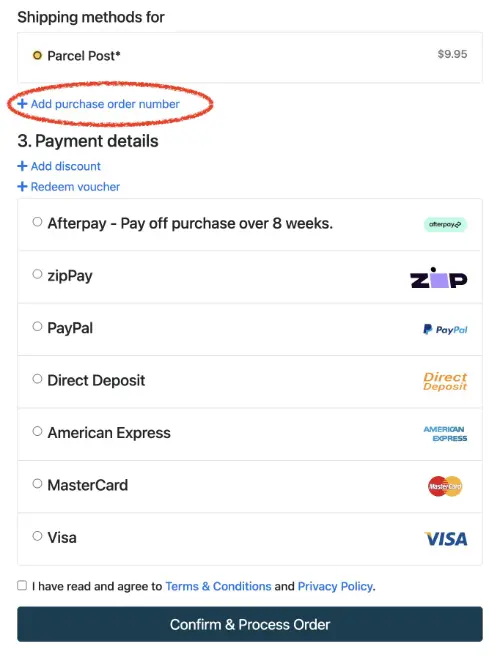
Option 2: The Direct Order Process
If you already have approval and just need your PO number to appear on the final invoice.
-
Checkout: Add items to your cart and proceed to checkout.
-
Reference Your PO: Enter your PO Number in the designated field during the checkout process.
-
Payment: Select Direct Deposit if not paying when you place the order.
Important: About Physical PO Documents
Many customers ask if they need to email a PDF copy of their Purchase Order. You do not need to send a physical copy! Because I am a one-person manufacturing operation, I spend my day on the workshop floor rather than at a desk. Our system is designed so that you control the data entry. When you enter your PO number into the web portal:
-
It appears instantly on all your documents.
-
Your order is logged in the production queue immediately.
-
There is zero risk of manual transcription errors.
Finalizing Your Order
Once your order is placed (via either method above), you will receive an invoice showing the outstanding balance. As soon as your payment is made, I apply it to the order and the system automatically sends you a final "Paid in Full" invoice for your records.
This is the fastest, most reliable way to move your project from the "Request" phase to the "Manufacturing" phase.